A Midweek Reset for a Plan That Drifted
A midweek reset for a plan that drifted separates unfinished tasks from changed priorities, helping you choose one useful next action without rebuilding everything.
By Wednesday afternoon, the note on your desk may still say “send the draft”, while a new request has nudged it aside and your attention keeps returning to both. A midweek reset for a plan that drifted is a brief review of what changed, what remains possible and what deserves your next move.
The point is not to rescue every task or remake the week from scratch. It is to distinguish work that is merely unfinished from work that no longer belongs in the plan, then choose one reasonable action. A calendar, notebook or plain sheet of paper is enough.
Name the friction you can actually see
A drifting plan can feel like one large failure, but its cause is often more specific. Tasks may have taken longer than expected, an urgent request may have displaced them, or the original goal may no longer fit. Naming the friction helps you respond to the situation rather than treat every unfinished item as a personal shortcoming.
Write down what happened in neutral language. “The appointment took the afternoon” is more useful than “I wasted the day”. “The draft needs information I do not have” points towards a decision; self-reproach does not.
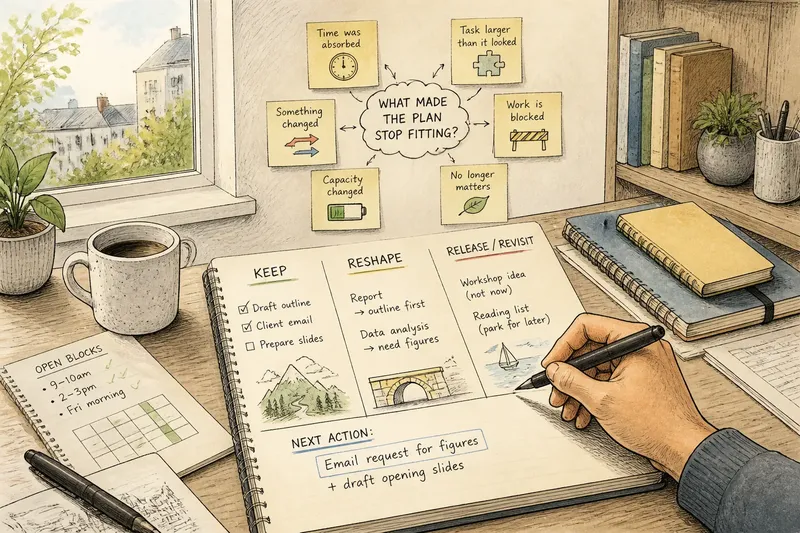
- Time was absorbed: If other work, appointments or interruptions used the space you expected to have, then remove or reschedule an item; otherwise, check whether another cause applies.
- The task was larger than it looked: If its label hides several actions or an unclear first move, then break it into a visible next action; otherwise, leave its scope intact.
- Something changed: If a deadline, request or personal priority shifted, then revise the item’s place in the plan; otherwise, keep its original priority for now.
- Your capacity changed: If your energy, concentration or available time differs from what you assumed, then choose a lighter task or adjust the timing; otherwise, assess the task on its own merits.
- Work is blocked: If you are waiting for information or a decision, then record who or what you are waiting for and choose an independent action; otherwise, proceed with the next clear step.
- The item may no longer matter: If it would not help your current goal, then release it from this week’s active list; otherwise, keep it for a fresh look at its timing and size.
More than one cause can apply. Ask, “What condition made this plan stop fitting?” rather than “Why did I fail?”
Separate unfinished tasks from changed priorities
Unfinished work still matters, but has not been completed yet. A changed priority has lost its place, become less relevant or come to depend on something outside your control. Those situations call for different responses.
For each open item, ask: “If I had a clear hour for this, would I still choose to use it here?” If the answer is yes, the task may belong in the revised plan. If the answer is no, or you cannot answer until someone else responds, do not quietly carry it forward as though nothing changed.
Sort each item into one of three groups:
- Keep: If the task is still relevant and possible to advance, then keep it in the plan; otherwise, assess whether it needs reshaping or release.
- Reshape: If the task still matters but is too broad, blocked or poorly timed, then define a smaller action or record the dependency; otherwise, keep its current form.
- Release or revisit: If the task is no longer useful now or awaits a decision, then remove it from the active list and note what would prompt a review; otherwise, return it to Keep or Reshape.
“Release” does not have to mean abandon forever. It can mean removing an item from this week’s active list and noting what would need to change before you reconsider it. That small distinction stops a deferred task from posing as an immediate obligation.
Choose a next action that fits the remaining space
Once the list is sorted, look at the actual time and attention left in the week. Do not assume every open slot is usable: a short gap between commitments may suit a quick reply but not careful drafting. Treat your calendar like a lunchbox: its compartments help you see what can fit, but they cannot make a large task smaller.
Choose one task and make its next action visible. “Work on the report” leaves you facing the whole report; “open the outline and mark the sections that need figures” gives you a clear point of entry. The action should be small enough to begin without first solving the entire project.
Say you planned to prepare a presentation, but a colleague has not sent the figures you need. Your starting inputs are the unfinished presentation, the missing figures and an open block that is suitable for independent work. First, send a concise request for the figures. Next, use that block to draft the opening slides without inserting unsupported numbers. The result is a clear request and a draftable section advanced; if the opening slides cannot be drafted without the figures, record the dependency and choose another task that fits the available time.
When two tasks both seem important, ask which one would make the next decision easier. Sending a question may clear a blockage; sketching an outline may reveal that a task is smaller than it seemed. Choose the action that creates useful clarity, not automatically the item with the most anxious wording.
Resolve the questions that keep a plan drifting?
Why do I keep moving the same task forward?
Repeatedly copying an item onto a new list preserves its place without examining whether it belongs. Identify why it has not moved: an unclear action, a missing response, insufficient time or a changed priority, then reshape it, record what you are waiting for, schedule a suitable opening or release it from the current plan.
What if everything still feels urgent?
Urgency can describe a deadline, but it can also describe discomfort about leaving something undone. Check which items involve an external commitment and which mainly feel pressing because they are visible; if commitments genuinely collide, contact the people involved and ask what can move rather than promising more than your available time allows.
What if the original goal no longer feels right?
Do not force a task back into the plan just because it was there on Monday. Write down what has changed and what decision would clarify the goal; if another person’s input matters, make the request, and if you remain unsure, choose a modest information-gathering action.
How much of the week should I replan?
Replan only the portion affected by the drift. Keep commitments and tasks that still fit, adjust the items that do not, and leave distant plans alone unless new information has changed them too.
Finish with a clear hand-off
Before returning to work, write down the action you chose, when or under what condition you will take it, and what you have deliberately moved or released. This is not a second full plan; it is a hand-off to your next working moment, so you do not have to reopen the whole debate.
A useful midweek reset for a plan that drifted ends with a smaller, more honest commitment than the one you started with. If new work arrives, compare it with the priority you chose and decide what will move in exchange; do not add it as though time had appeared. That simple trade keeps the plan responsive without making every interruption the new plan.